6 MIN READ
Redesigning Confluence for Context: Technical Strategies That Scale
How Confluence Admins Can Structure Information for Speed, Clarity, and Enterprise-Wide Impact
Namita Awasthi | August 20, 2025




As a Confluence Admin, you’ve likely stretched the platform to its limits - using macros, creating templates, managing permissions, automating workflows, and guiding teams to maintain consistent documentation practices.
But even the most well-organized instance can hit a wall.
That wall appears when teams start asking:
But even the most well-organized instance can hit a wall.
That wall appears when teams start asking:
- “Where do I find the latest updates for this product launch?”
- “Why do I need to open five tabs just to prep for one deliverable?”
- “Is this the most recent version of the data?”
These aren’t UX issues. They’re symptoms of a deeper structural problem: Confluence isn’t inherently contextual.
And that’s exactly where forward-thinking Admins can lead the next wave of transformation.
And that’s exactly where forward-thinking Admins can lead the next wave of transformation.
The Core Challenge: Static Pages in a Dynamic World
Let’s take a practical example. Imagine a team gearing up for a new product launch.
They jump into Confluence to find the launch checklist, but soon realize the actual work is fragmented across other tools:
They jump into Confluence to find the launch checklist, but soon realize the actual work is fragmented across other tools:
- The feature roadmap lives in Jira
- Customer feedback sits in Productboard
- Forecasts and pricing models are in the Financial systems
- The go-to-market deck is somewhere in Google Drive
- And real-time status meetings are captured in Slack or Zoom
So even though Confluence is the supposed "source of truth," it’s become a static vault, disconnected from the dynamic flow of work.
That gap between content and context is what slows teams down. And it's a gap Admins are uniquely positioned to close.
That gap between content and context is what slows teams down. And it's a gap Admins are uniquely positioned to close.
A Better Approach: Designing for Context
Instead of organizing Confluence around tools, teams, or timelines, imagine organizing it around business entities like Products, Customers, Regions, or Teams.
This approach of structuring Contextual Spaces shifts the focus from content management to information design.
Key Strategies for Context-Driven Architecture:
1. Entity-Based Structuring
This approach of structuring Contextual Spaces shifts the focus from content management to information design.
Key Strategies for Context-Driven Architecture:
1. Entity-Based Structuring
- Define the business entities that matter most (e.g., “Product Launch: Titan v2”).
- Create standardized, scalable templates for each entity type.
- Ensure every space includes key dimensions: goals, roadmap, tasks, stakeholders, performance metrics, etc.
2. Data Embedding, Not Just Linking
- Use integrations to embed live data from Jira, Salesforce, Financial tools, etc., directly into Confluence.
- When stakeholders view a product’s space, they see up-to-date timelines, sales forecasts, and project blockers. No copy-pasting needed.
3. Automation Rules to Reduce Admin Overhead
- Use automation to generate contextual spaces when a new product is approved or enters pre-launch.
- Pull in the right team members, pre-fill data panels, assign key tasks, and trigger relevant Slack notifications.
4. Cross-Linked Navigation
- Design entity relationships: for instance, link a product space to its GTM team, target customers, and supporting documentation.
- Let users move through Confluence the way they think, not the way the folder hierarchy demands.
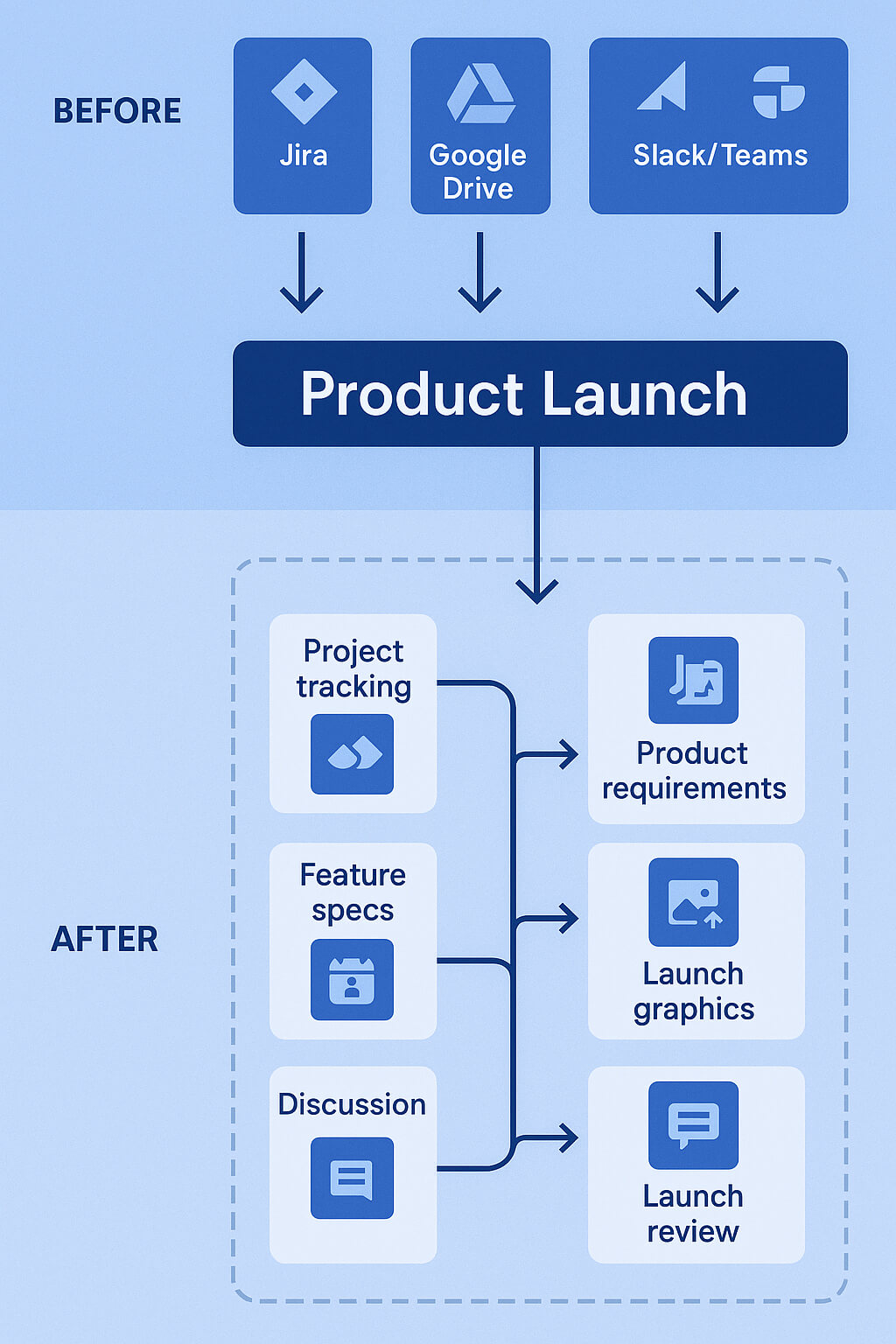
How ContextSpace Amplifies This Vision
This architectural shift can be achieved manually, but it’s tedious, fragmented, and prone to breaking.
ContextSpace offers a systemized way to redesign Confluence around context, not content silos.
What ContextSpace Does for Admins:
ContextSpace offers a systemized way to redesign Confluence around context, not content silos.
What ContextSpace Does for Admins:
- Automatically creates entity-based workspaces
- Pulls real-time data from across your enterprise tools
- Connects people to what they need, based on entity relationships
- Structures information in a consistent, scalable way
- Reduces admin effort and prevents workspace sprawl
Benefits for Admins and the Organization
For Admins
For the Organization
Scalable, reusable architecture
Faster execution on projects
Fewer one-off requests
Greater cross-functional alignment
Live data, fewer maintenance headaches
More clarity, less duplication
Unified framework for teams
Productivity gains across departments
Final Thoughts: From Admin to Architect
The future of Confluence administration isn’t just about uptime and permissions - it’s about structuring information to unlock productivity. As a Confluence Admin, you’re no longer just a technical gatekeeper. You’re a system designer shaping how your organization works.
By rethinking how information is structured, and shifting from static documentation to dynamic, contextual spaces, you unlock the next level of collaboration, transparency, and velocity.
This isn’t just about making Confluence better. It’s about making your organization better - faster, smarter, and more aligned.
By rethinking how information is structured, and shifting from static documentation to dynamic, contextual spaces, you unlock the next level of collaboration, transparency, and velocity.
This isn’t just about making Confluence better. It’s about making your organization better - faster, smarter, and more aligned.
Want to see how ContextSpace helps Confluence Admins scale smarter?
Book a walkthrough or connect with our team to explore what contextual design could look like in your instance.

Namita Awasthi
A driving force behind ContextSpace, Namita led the ideation and development of the platform, turning bold ideas into a practical solution that helps teams streamline work, surface insights, and scale productivity.